
Model Context Protocol (MCP), Explained Plainly
The Model Context Protocol lets any AI model use your tools through one standard. How MCP works, where it breaks, and why it makes models swappable.

You don't have an AI model problem anymore. You have a plumbing problem.
The Model Context Protocol (MCP) is the open standard that fixes it. It defines one way for any AI app to find and use outside tools and data, so a connector built once works in every app that speaks the protocol.
Without it, the smartest model you can pay for still can't see your calendar, your CRM or the spreadsheet your team changed this morning. You copy, you paste, you explain, and tomorrow you do it again.
Anthropic released MCP in November 2024. Since December 2025 it has belonged to a neutral foundation under the Linux Foundation, with OpenAI, Google, Microsoft and AWS among its members.
That's the short answer. MCP is a wiring standard.
Think of the outlets in your house. You don't rewire the kitchen when you buy a new toaster, and the toaster company never needs to know who built your walls. The outlet is a promise both sides keep.
MCP is that promise between AI apps and the systems where your work lives.
It also has a consequence most people miss.
Once your tools sit behind MCP, the model becomes the easy part to swap, and the app you plug everything into becomes the decision that matters.
MCP replaced a wiring problem that grew by multiplication
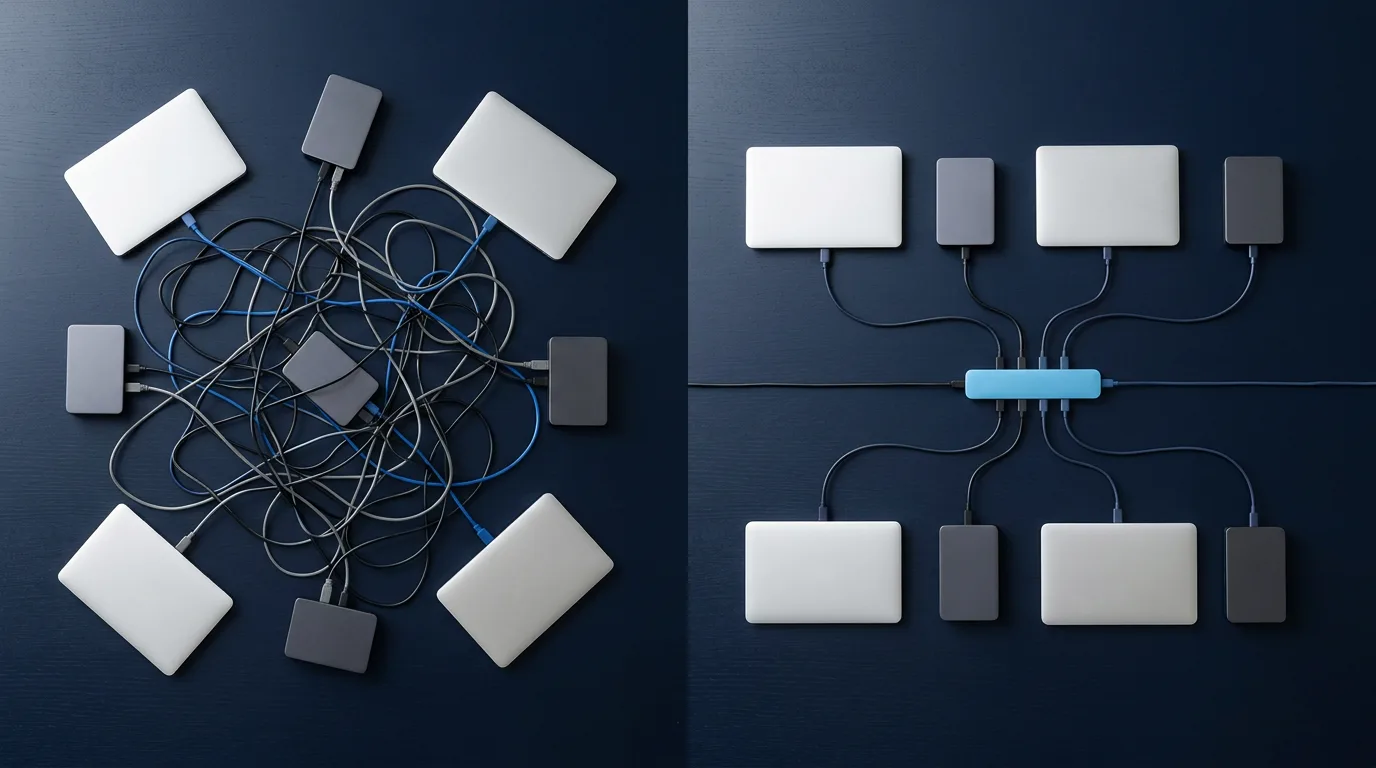
Before MCP, every pairing of an AI app and a business tool needed its own custom integration. One chat app had its own plugin format. Each coding assistant had its own extension system. A company that wanted its product inside AI apps built a separate connector for every one of them.
That math multiplies.
Say four AI apps each want to use five tools. Without a shared standard, that's twenty separate integrations, each one written and maintained by somebody. With a shared protocol, each app implements a client once and each tool ships one server. That's nine pieces of work instead of twenty.
Now add a sixth tool. The old way, it needs four new integrations, one per app. The MCP way, it needs one server, and all four apps can use it the day it ships.
Developers call this turning an M×N problem into an M+N problem.
The idea has a track record. The MCP specification says it takes inspiration from the Language Server Protocol, which did the same job for code editors. Before that protocol, every editor needed its own plugin for every programming language. After it, a language shipped one server and every editor that spoke the protocol got autocomplete and error checking for that language.
MCP applies the same trick to AI. The tool ships one server. Every AI app that speaks MCP can use it.
It helps to be clear about what you're getting. MCP doesn't make a model smarter, and you don't buy it. The spec and its software kits are open source and free. What it gives a model is reach. You pay, if at all, for the app that speaks MCP and for the tools on the other end.
If you've fought with AI tools that refuse to talk to each other, this is the layer that was missing.
Try this before you read on. Write down every tool you copy information out of and paste into an AI chat during a normal week: your inbox, your project board, your docs, your analytics. Each one on that list is a candidate for an MCP server, and the ones you touch daily are where you start.
Three parts do the work: a host, a client and a server
MCP splits the job into three roles. The names trip people up, because "client" and "server" mean slightly different things here than they do on the web.
The spec defines them this way. Hosts are the AI applications that start connections. Clients are connectors that live inside the host. Servers are the services that provide context and capabilities. They talk to each other in JSON-RPC 2.0, a plain and well-worn message format.
Each part, in terms you'll recognize, looks like this.
| Part | What it is | What you see |
|---|---|---|
| Host | The AI app you type into | A desktop chat app, a code editor, an AI workspace |
| Client | A connector inside the host, one per server | Nothing. It works in the background |
| Server | A small program that exposes one system to AI | "GitHub", "Notion" or "Stripe" in a list of connections |
One host can hold many clients, and each client keeps its own connection to one server. Connect GitHub and Notion to the same app and you have one host, two clients and two servers.
The hosts are already on your machine. The Linux Foundation's announcement lists Claude, Cursor, Microsoft Copilot, Gemini, VS Code and ChatGPT among the platforms that adopted MCP.
Servers come in two kinds, and the difference decides how hard your setup is.
A local server runs on your own computer. The host starts it as a program and talks to it directly. That's how MCP launched: the first servers ran on the desktop, next to a desktop chat app. Local servers can reach files on your machine, but setting one up usually means installing a runtime and editing a configuration file.
A remote server runs on the internet, and the host talks to it over HTTP. You add it by its address and sign in, the same way you'd connect any web app. At the same launch, Cloudflare's CTO said the company had seen "an explosion of remote MCP servers" over the protocol's first year.
The decision rule is simple. If you're not a developer, look for a remote server first. If the system you need only offers a local one, that's an afternoon of setup, so budget it.
Developers who want the internals can read the protocol end to end. Everyone else needs one fact from this section: the server belongs to the tool, and the host belongs to you.

A server can offer three things, and the host can offer three back
When a client connects, both sides announce what they support. The spec calls this capability negotiation. In practice, the host asks the server what it can do and gets back a list.
Servers can offer three kinds of things, and each one is controlled by someone different.
| Feature | Who controls it | What it's for | Everyday example |
|---|---|---|---|
| Tools | The model decides when to call one | Actions the model can run | Create an issue, look up an invoice, send a message |
| Resources | The app or the user picks them | Data the model can read | A file, a database table, a page of docs |
| Prompts | The user chooses one | Reusable instructions | A "summarize this pull request" template with the fields filled in |
Tools are the part you'll feel. They're where the model stops talking and starts doing.
Resources are the quieter half, and they change how you should ask for things. A resource is something you hand the model on purpose, like attaching a file. A tool is something the model reaches for on its own. If you want the model to work from one specific document, point it at the resource. If you want it to go find the right document, let it use a search tool, and expect it to sometimes find the wrong one.
The host can offer the server three things in return. Sampling lets a server ask the host's model to write something, with your approval. Roots tell the server which folders or locations it may work inside. Elicitation lets a server pause in the middle of a job and ask you a question, such as which account to use.
You'll rarely see these by name. You'll see their effects: a connection that asks you to confirm something, or a server that knows to stay inside one project folder.
Build one habit before you connect anything: read the server's tool list. The names usually tell you what you need. A server whose tools all start with list, get or search can look but not touch. A server with tools that send, delete or create payments can act on your behalf, and that deserves a different level of trust.
There's a failure mode hiding in those lists. Tool descriptions are text the model reads to decide what to call. The spec warns that descriptions of tool behavior "should be considered untrusted, unless obtained from a trusted server." A sloppy description makes the model misuse a tool. A malicious one can steer it somewhere you didn't intend.
Follow one request from your sentence to the result
Diagrams make MCP sound more complicated than it is. Walk one request through instead.
Say you've connected a payments server and an email server to your AI app, and you type: "Find the invoices more than 30 days overdue and draft a reminder for each customer."
Here is what happens, in order.
- When the app connected each server, it asked what tools it offers. The payments server answered with tool names, plain English descriptions and the inputs each tool expects.
- The app hands those descriptions to the model along with your sentence. The model now knows what it could do, without knowing anything about how the payments system works inside.
- The model decides it needs a tool. It replies with a structured request: call the tool that lists invoices, filtered to overdue ones.
- The app shows you that request and asks before running it. The spec is direct about this: hosts "must obtain explicit user consent before invoking any tool."
- The client sends the request to the server. The server calls the payments system's normal API with your credentials and sends the results back.
- The model reads the results and writes the drafts. Sending them through the email server is a second tool call, and it gets a second approval.
The model never touches the payments system. It never sees your password. It asks, the app checks with you, and the server does the work.
Nothing in those six steps depends on which model is reading the descriptions. Swap one model for another and the same servers and the same approvals still apply. That's the outlet again. The toaster changed. The wall stayed put.
Step 3 is where this breaks in practice. A model can pick the wrong tool, pass a bad filter or call the same tool five times in a row.
The fix is boring, and it works. Give the request a clear scope, such as "only invoices from this quarter." Keep approvals on while you learn how a given model behaves with a given server. Read the call before you click yes, because the call tells you exactly what the model understood.

MCP sits on top of your APIs and leaves them in place
People ask whether MCP replaces APIs. Look back at step 5. The server called the payments company's ordinary API, and that API is still doing the real work.
MCP is the layer that describes an API to a model in a form the model can discover while it's running.
The two differ in four ways that matter.
| A regular API | An MCP server | |
|---|---|---|
| Written for | A developer who reads the docs | A model that reads tool descriptions |
| When it's discovered | Ahead of time, when someone writes code | When the app connects and asks |
| One integration serves | The one app it was coded into | Every app that speaks MCP |
| When you switch AI apps | The integration gets rebuilt | You connect the same server again |
Take a concrete case. Your team keeps its docs in Notion. Notion has had an API for years, and it also built an MCP server on top of it. Without the server, getting your docs into an AI app means either that app built a Notion integration or you paste pages in by hand. With the server, any MCP host can search and read your workspace within whatever access you grant when you connect it.
The API underneath didn't change at all. Notion added one layer, and every AI app that speaks MCP got access to it at once.
If you build software, the decision rule is short. When exactly one app of yours needs to call a system, call its API directly. When you want every AI app your customers use to work with your product, ship an MCP server.
If you only use software, the rule is shorter still. When a tool you rely on announces an official MCP server, that tool just became usable from any AI app you choose. That's worth knowing before you renew a subscription that exists only because one app had the integration you needed.
Nobody owns MCP now, and that's why you can build on it
A standard is only as good as the odds it'll still be around in five years. MCP's odds changed a lot in its first year.
It went from one company's experiment to shared ground in four steps.
| When | What happened |
|---|---|
| November 2024 | Anthropic open-sources MCP, with the spec, software kits and a set of starter servers |
| September 2025 | The official MCP Registry opens as a public index of servers |
| November 25, 2025 | A major spec release adds long-running tasks, simpler sign-in and an extension system, and stays backward compatible |
| December 9, 2025 | MCP moves to the new Agentic AI Foundation under the Linux Foundation |
That Linux Foundation announcement names the foundation's platinum members: Amazon Web Services, Anthropic, Block, Bloomberg, Cloudflare, Google, Microsoft and OpenAI. It also counted more than 10,000 published MCP servers at the time.
The first anniversary post from MCP's maintainers adds the community side: 58 maintainers, more than 2,900 contributors on Discord and over 100 new contributors joining each week. The registry had close to 2,000 entries about two months after it opened.
The November 2025 release changed two things you'll notice as a user. Tasks let a server run a job that takes minutes or hours, such as a code migration or a long research run, and report back when it's done. URL mode elicitation lets a server send you to your own browser to sign in to a third party, so your password never passes through the chat app.
Why does the Linux Foundation part matter to you? It's the same foundation that looks after Linux, Kubernetes, Node.js and PyTorch. Moving MCP there means no single AI lab can rewrite the rules to favor its own models. Rivals now fund the same standard, and that's about the strongest guarantee an open standard can get.
MCP is still young, and it shows. The long-running task feature shipped as experimental, which the maintainers say means it isn't finalized yet. Sign-in has changed more than once. Some servers are excellent and some are weekend projects with a logo.
So the verdict comes with a condition. Build on the protocol. Be picky about the servers.
A practical filter for picky: prefer the server published by the company that makes the system (GitHub's own server for GitHub, Notion's own for Notion), then servers listed in the official MCP registry, then everything else, slowly.

The real danger is the mix of servers you connect
MCP's biggest risk sits in what you plug in next to what.
Simon Willison, the developer who coined the term "prompt injection," calls the dangerous combination the lethal trifecta: an AI agent with access to your private data, exposure to content a stranger controls, and a way to send information out. Put all three in one place, and an attacker can hide instructions in the content that the model may follow.
His example is blunt. If your assistant can read your email, anyone can email your assistant.
It has already happened. In May 2025, researchers showed an attack on GitHub's official MCP server. That one server could read public issues an attacker could file, read private repositories and open pull requests, which put all three ingredients in a single connection. Willison's verdict on the defenses: "we still don't know how to 100% reliably prevent this from happening."
MCP is especially exposed because its whole point is mixing tools from different sources. Each server can look harmless alone. The risk shows up in the combination.
Here's how it could go in an ordinary week. You connect your inbox so the AI can sort mail. You connect your files so it can attach the right contract. You connect a web tool so it can look things up. Then a message arrives with a line at the bottom telling the assistant to find the latest contract and paste it into a link. Each server did exactly its job. The combination did the damage.
A server you wouldn't let a stranger email should never share a chat with your inbox.
Before you connect anything new, run this check across everything already connected in the same place.
- List the servers that can read private data: your files, your CRM, your private repositories.
- List the servers that read content other people write: an inbox, public issues, web pages, support tickets.
- List the servers that can send anything out: email, posts, messages, web requests. A tool that renders a link counts.
- If one chat or one agent has something from all three lists, split it. Give the inbox to one agent and the private files to another.
- Keep approval prompts on for any tool that sends, deletes, publishes or pays. Turn them off only for read-only tools you've watched for a while.
- Remove servers you haven't used in a month. An idle connection is still a connection.
The spec puts the responsibility where it belongs. It says MCP "cannot enforce these security principles at the protocol level," and asks the apps that implement it to build consent and authorization into their own design. That makes the app you choose part of your security. It's also the choice that matters most for a second reason.

The model context protocol moves lock-in from the model to the app
Before MCP, your connections were tied to one vendor. If you wired your tools into one chat app's plugin system, those tools worked in that app and nowhere else. Leaving meant rebuilding.
With MCP, the server is portable. The GitHub server works the same way in a desktop chat app, a code editor or an AI workspace. The model on the other end is interchangeable too, because, as the walkthrough showed, it only reads tool descriptions.
So what's left to lock you in?
The host. The app holds your connections, your approvals, your agents, your history and the conversation where you explained what you're working on. That's the expensive part to move.
You might be thinking you use one model for everything, so none of this applies. If one model really does everything you need today, fair enough. Your connections still work.
But models keep leapfrogging each other, and they fail in different ways. Claude and ChatGPT fail in opposite directions on purpose, so the right one changes from task to task. The day you want a second model, a host tied to one lab makes you rebuild every connection in a second app, and your context stays behind in the first.
That's the case for a host that runs many models. The connections stay put, and the conversation survives when you switch AI models in one workflow. It's the core idea behind an AI aggregator, and MCP is what extends it from chat to the tools you work in.
The argument is weaker in one place. If you're a developer who lives inside one code editor all day, that editor is your host, and it likely supports several models already. The host decision is made for you, and it's a fine one.
For everyone else, put these questions to any AI app before you trust it with your connections.
| Question | Why it matters |
|---|---|
| Can I add a remote server by its address? | Remote servers are the ones a non-developer can set up in minutes |
| Do my connections work with every model in the app? | Otherwise you're locked to one lab again, one level up |
| Does it ask before a tool acts, and show me the call? | The spec leaves consent to the app |
| Can I limit a server to one agent or project? | That's how you keep the lethal trifecta apart |
| Does switching models keep the conversation? | Context is the part you can't rebuild |
Connect your first MCP server this week
You don't need a strategy deck. You need one server doing one boring job well.
Here's the order I'd follow.
- Pick one read-only job you do every week. Summarizing new issues, pulling numbers from a dashboard or reading a folder of meeting notes all make good first jobs.
- Find the official server for that system, from the company that makes it or from the MCP registry.
- Prefer a remote server you add by address. Take a local one only if you're comfortable installing software and editing a config file.
- Connect it to one agent or one project, not to every chat you have.
- Run it for a week with approvals on, and read every tool call before you approve it.
- Add a write tool only after that week, one at a time, and run the trifecta check from earlier each time.
When a server misbehaves, and one eventually will, disconnect first and diagnose second. Most problems are the model picking the wrong tool, which a tighter request fixes. If the tool itself returned an error, that's the server's problem, so check its publisher for an update. If it worked yesterday and fails today, the sign-in probably expired, and reconnecting solves it.
In Magai, any agent can connect to external MCP servers, and that agent runs on whichever model you pick. You set up the MCP connector once, then move from one model to another in the same thread without losing the context or reconnecting anything. For apps that don't have a good server yet, Magai's 150+ built-in integrations, including Gmail, Google Drive, Google Calendar and Slack, connect directly to agents.
For a complete workflow built this way, here's how to automate social media with MCP, from planning posts to scheduling them.
The rest of our guides on how the models differ, and where each one fits, live under artificial intelligence.
Nobody picks a house for its toaster.
Wire the outlet once. Then plug in whatever's best this month.
More in Artificial Intelligence

Artificial Intelligence
Perplexity vs ChatGPT: Pick by How They Fail
Perplexity vs ChatGPT: one cites sources you can click, the other sounds sure even when wrong. How each fails, what each costs, and a 20 minute test.

Artificial Intelligence
DeepSeek vs ChatGPT: Price the Task, Not the Token
DeepSeek vs ChatGPT: one is a finished app, the other is cheap raw models. Capability gaps, real task costs, privacy, and a five prompt test.

Artificial Intelligence
MCP Client: What It Does and How to Pick One
An MCP client holds your connection to every MCP server. Here is what it does, the five kinds, and how to pick one for your work.